Guides
Albania Registration Guide: Step-by-Step Process

Albania Registration Guide: Step-by-Step Process

This guide gives you copyable, step-by-step checklists to complete the most common registrations in Albania: company formation, event setup, online profiles, trademark filing, and vehicle customs clearance. The three immediate actions are: (1) identify the correct portal for your registration type, (2) prepare your ID and required documents before logging in, and (3) submit and pay using the method that matches your situation.
Quick portal reference:
- Company registration: e-Albania / QKB
- Vehicle customs: Dogana
- Vehicle registration: DPSHTRR
- Trademark: Albanian Patent and Trademark Office (DPPM)
Every section below covers the exact steps, required documents, fees, and timelines for each registration type, plus a universal troubleshooting checklist at the end.
Key Takeaways
The most critical action across every Albanian registration type is preparing complete, correctly formatted documents before opening any portal, since document errors cause nearly all rejections and delays.
| Point | Details |
|---|---|
| Company registration | Submit via e-Albania for 0 Lek fee and 24-hour processing; use QKB as your one-stop-shop. |
| Statutory deadlines | File annual statements by July 31; notify changes to QKB within 15 days of any decision. |
| Vehicle customs | Pre-register your ID in Asycuda World before attempting customs clearance at Dogana. |
| Translation exceptions | EU, U.S., and Canadian technical documents in English may not need notarized translation at DPSHTRR. |
| Universal rule | Names must match exactly across every document; mismatches are the top cause of formal returns. |
Table of Contents
- What is the step-by-step registration process for a company in Albania?
- How do you set up registration for an event?
- How do you create and verify an online profile or account?
- How do you file a trademark in Albania?
- What documents do you need to import and register a vehicle in Albania?
- Universal checklist and how to fix a rejected submission
- What are the key deadlines and legal obligations for Albanian registrations?
- What practitioners actually get wrong about Albanian registrations
- Sources
What is the step-by-step registration process for a company in Albania?
QKB (Qendra Kombëtare e Biznesit) acts as Albania’s one-stop-shop, integrating commercial registration with tax and social security enrollment in a single submission. When you submit online via e-Albania, standard cases are often processed within 24 hours, and the counter fee drops from 100 Lek to 0 Lek for online submissions.
The 7 steps to register a company
- Choose your legal form. The most common choices are a sole proprietorship (person fizik) or a limited liability company (SH.P.K.). SH.P.K. requires at least one shareholder and a minimum capital of 100 ALL.
- Reserve your business name. Check name availability through the QKB portal before drafting any documents. Duplicate or confusingly similar names are rejected outright.
- Prepare and notarize founding documents. For a SH.P.K., you need a notarized articles of association (statut). Sole proprietors need a signed declaration of activity.
- Select your NACE activity code. Pick the code that most accurately describes your primary business activity. Mismatched codes are one of the most common reasons for formal returns.
- Prepare ID copies and supporting documents. See the table below for the full list by entity type.
- Submit via e-Albania or the QKB counter. Online submission is free and faster. Counter submission carries the 100 Lek symbolic fee.
- Receive your NIPT and certificate. After approval, QKB issues your tax identification number (NIPT) and registration certificate. Verify publication in the official QKB register.
Documents required by entity type
Pro Tip: Accountants consistently flag one avoidable error: the name on your ID must match exactly the name on every other document you submit. A single character difference, an abbreviated middle name, or a maiden name discrepancy triggers a formal return and resets your timeline.
After registration, statutory changes such as a new address, administrator, or business name must be notified to QKB within 15 days of the decision. Missing that window carries penalties.
How do you set up registration for an event?
A reliable event registration flow has six core steps: define the event, choose a platform, build the form, test it, publish, and manage attendees. Skipping the testing phase is the single most common reason organizers face refund requests on day one.
6 steps for event organizers
- Define your event parameters. Set the date, venue, capacity cap, ticket types (free, paid, VIP), and whether you need VAT invoicing for ticket sales.
- Choose a registration platform. Options range from general-purpose tools like Eventbrite or Google Forms to dedicated event management software. For paid events in Albania, confirm the platform supports local payment methods (bank transfer, card).
- Build your registration form. Keep required fields to the minimum needed. Standard fields: full name, email, phone number, ticket type, and dietary or accessibility needs if relevant.
- Add payment and policy details. If selling tickets, include your refund policy, VAT number (if applicable), and payment confirmation flow before publishing.
- Test the full flow end-to-end. Register yourself as a test attendee. Confirm the confirmation email arrives, the payment processes, and the ticket or QR code generates correctly.
- Publish and manage the attendee list. Export your list regularly and set up a check-in process for the day of the event, whether that is a printed list or a mobile check-in app.
Common mistakes that kill conversions or cause refunds:
- Asking for too many fields upfront (name, company, job title, dietary needs, T-shirt size) before the attendee has committed
- No clear refund or transfer policy visible before payment
- Confirmation email landing in spam because the sender domain is not verified
- No mobile-friendly form layout
- Capacity not capped, leading to overbooking
For last-minute registrants, keep a manual override option. A simple spreadsheet backup with a QR scanner at the door handles walk-ins without breaking your system.
How do you create and verify an online profile or account?
Use a unique email address, a dedicated phone number, and pre-prepared ID scans. Save every confirmation number the moment it appears on screen. That single habit prevents most account-recovery headaches.
Steps for any registration portal
- Choose your login credentials. Use an email address you actively check. Avoid shared or work emails for personal government accounts.
- Prepare your scanned ID or photo. Most government portals accept JPEG or PDF files under 2 MB. Check the specific portal’s file size and format requirements before scanning.
- Enable two-factor authentication (2FA). Set it up during registration, not after. Most e-government portals, including e-Albania, support SMS-based 2FA.
- Verify your email and phone. Click the verification link within the time window given (often 24 hours). Generate and enter any one-time password (OTP) as prompted.
- Save your user ID and set up recovery options. Write down your username, add a recovery email, and screenshot the confirmation page.
Typical required fields and file specs:
- Full legal name (must match ID exactly)
- Date of birth
- National ID number or passport number
- Email address (verified)
- Phone number (for OTP)
- Profile photo: usually JPEG, max 1 MB, minimum 200x200 pixels
- ID scan: PDF or JPEG, max 2 MB per file
Systems like the UN’s Indico event platform follow this same pattern: choose credentials, verify email, generate OTP, and save credentials for future login. The U.S. Copyright Office’s eCO portal goes further, requiring applicants to select the correct application type before starting, since the standard form cannot be used for all registration categories. That principle applies to Albanian government portals too: read the form options before you start filling one in.
Pro Tip: Use a password manager like Bitwarden or 1Password to store credentials for every portal. Screenshot or PDF-save the final confirmation page before closing the browser. Government portals sometimes time out and the confirmation is not resent automatically.
How do you file a trademark in Albania?
Filing a trademark in Albania proceeds through the Directorate of Patents and Trademarks (DPPM), part of the Albanian General Directorate of Industrial Property. The application yields provisional publication and, if no oppositions are filed during the statutory period, eventual registration and legal protection.
Steps to register a trademark
- Conduct a clearance search. Search the DPPM database for identical or similar marks in your target Nice classes before investing in the application. A conflict found at this stage costs nothing to resolve; one found after filing costs time and fees.
- Select your Nice classification classes. Trademarks are registered by class of goods or services. Filing in the wrong class gives you no protection where you actually operate.
- Complete the application form. The DPPM provides official application forms. Fill in the applicant’s full legal name and address, the mark’s representation (wordmark, figurative, or combined), and the selected classes.
- Attach specimens or logo files. Submit a clear reproduction of the mark. For figurative marks, a high-resolution image (typically JPEG or TIFF) is required.
- Pay the application fee. Fee schedules are published on the DPPM website. Verify the current amounts directly on the portal before submitting, as fees can be updated.
- Track the publication and opposition period. After formal examination, the mark is published in the official bulletin. Third parties have a statutory window to file oppositions. If none are filed, registration proceeds.
Renewal and validity:
- Albanian trademarks are valid for 10 years from the filing date.
- Renewal must be filed before expiry; a grace period applies but carries an additional fee.
- Failure to renew results in lapse of protection.
Pro Tip: The most avoidable refusals come from descriptive marks (a word that simply describes the product) and from marks that are too similar to existing registrations. Run the clearance search yourself first, then consult an IP attorney if you find anything close. Attorney fees at the clearance stage are far lower than opposition proceedings.
When to consult an IP attorney: if your mark is figurative and complex, if you are filing in multiple classes, or if your clearance search returns anything similar in your primary class.
What documents do you need to import and register a vehicle in Albania?
Before customs clearance can begin, register your personal ID in the Asycuda World system. Missing this preregistration is the most frequent reason clearances are blocked at the border.
Steps for vehicle import and registration
- Pre-register your ID in Asycuda World. Submit a scanned copy of your national ID or passport to the Dogana (Albanian Customs) via the email address and within the time window specified on the dogana.gov.al portal. Do this before arriving at customs.
- Gather vehicle ownership and conformity documents. Required documents typically include: original title/ownership certificate, certificate of conformity (CoC), purchase invoice, and insurance.
- Present documents at customs and pay duties. Customs calculates duties based on vehicle age, engine size, and declared value. Pay at the designated customs point.
- Schedule and pass the physical vehicle inspection. Customs officers inspect the vehicle’s VIN against the documents. Any discrepancy stops the process.
- Complete DPSHTRR registration. After customs clearance, take the cleared vehicle to a DPSHTRR office with the full document set to obtain Albanian plates and a registration certificate.
Translation exceptions: DPSHTRR confirms that technical documents and certificates of conformity issued in English by EU, U.S., or Canadian producers or registries may be accepted without notarized translation. Many importers spend unnecessarily on translations when the originals are already in an accepted language. Verify this directly with DPSHTRR for your specific document set before paying a translator.
Critical warning: Customs authorities treat failure to correctly declare a vehicle’s transit or import status as potential smuggling. Accurate preregistration and declarations are not optional formalities.

For a detailed walkthrough of importing a car from Germany specifically, Carpulse’s Albania car import guide covers customs steps, fees, and documentation in full. If you are buying a used vehicle already in Albania, the used car buying guide walks through the ownership transfer and DPSHTRR registration steps.
For a comparative look at how vehicle transfer paperwork is structured in other markets, the Alberta vehicle transfer forms guide illustrates the form-field logic that applies broadly to ownership transfers.
Universal checklist and how to fix a rejected submission
Most registration rejections share the same five root causes. Fix them before submitting and you will avoid the majority of delays.
Universal pre-submission checklist:
- [ ] Valid, unexpired government-issued ID (scan at 300 DPI minimum)
- [ ] All names match exactly across every document
- [ ] File formats match portal requirements (PDF, JPEG, PNG as specified)
- [ ] File sizes are within limits (typically 2 MB per file)
- [ ] Notarized documents are present where required (company formation, some trademark filings)
- [ ] Correct classification code selected (NACE for companies, Nice class for trademarks)
- [ ] Proof of payment attached or payment reference number recorded
- [ ] Confirmation page saved or screenshot taken
Dos and don’ts:
- Do use your full legal name exactly as it appears on your ID, everywhere.
- Do check file size and format requirements on the portal before scanning.
- Don’t submit scanned documents as Word files or low-resolution photos.
- Don’t close the browser before saving your confirmation or reference number.
- Don’t assume a submission was received if you did not get a confirmation email.
Troubleshooting a rejected or delayed submission
- Check your confirmation email for the specific error code or reason for return.
- Review the returned documents against the checklist above. Most returns cite a specific field or attachment.
- Correct only the flagged items and resubmit. Do not restart the entire application unless instructed.
- Contact the relevant helpdesk with your reference number. QKB, e-Albania, and Dogana each have dedicated support contacts listed on their portals.
- Escalate to a professional if the same submission is returned twice without a clear explanation. An accountant handles QKB returns; a customs broker handles Dogana issues; an IP attorney handles DPPM refusals.
What are the key deadlines and legal obligations for Albanian registrations?
QKB’s one-stop-shop model reduces the number of separate agency visits required, but it also enforces fixed deadlines that carry real penalties. Knowing them before you register saves significant trouble later.
Statutory deadlines and obligations:
- Annual financial statements: Must be deposited with QKB by July 31 of the year following the reporting year. Late filing triggers progressive penalties.
- Statutory changes: Any change to company name, registered address, or administrator must be notified to QKB within 15 days of the decision. This applies to both sole proprietors and SH.P.K. entities.
- Vehicle registration after import: Complete DPSHTRR registration promptly after customs clearance. Operating an unregistered vehicle carries fines.
- Trademark renewal: File renewal before the 10-year mark expires. A grace period exists but adds cost.
These deadlines are set in the QKB legal framework and noncompliance can escalate from financial penalties to forced deregistration after prolonged inaction.
Fee summary:
Who must comply: every registered business entity in Albania, regardless of size or activity level. Dormant companies are not exempt from filing obligations.
Always verify current fees directly on the official portal before submitting. Fee schedules are updated periodically and third-party guides may carry outdated figures.
What practitioners actually get wrong about Albanian registrations
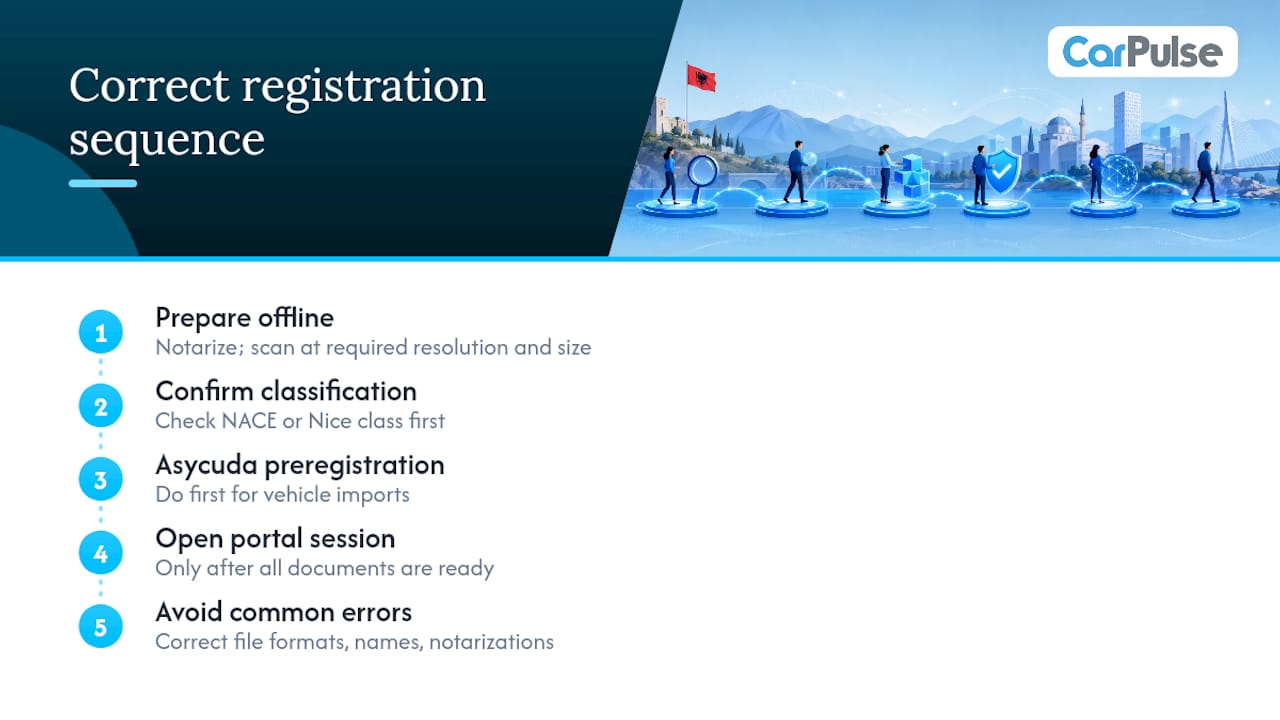
The conventional advice is to gather your documents and then log into the portal. That order causes most of the delays people blame on the system.
The smarter sequence is to prepare everything offline first: notarize what needs notarizing, scan all documents at the correct resolution and file size, and confirm your NACE or Nice class before opening a single portal. Government portals time out. If you are mid-session and realize you need a document you do not have, you lose the session and sometimes the partially completed form.
For vehicle registrations specifically, the Asycuda preregistration step catches people off guard because it is a separate action from the customs declaration itself. Customs brokers who handle vehicle imports regularly note that clients who skip this step face clearance blocks that can delay a vehicle for days. Do it first, before you arrange transport or schedule an inspection.
Carpulse handles the VIN-based documentation side of vehicle listings automatically, which means when a seller lists a car on the platform, the vehicle details populate from the VIN rather than requiring manual entry. That same principle applies to registration paperwork: accurate VIN data from the start prevents mismatches at DPSHTRR that would otherwise require corrections and re-inspection.
The broader point is that registration processes in Albania have genuinely improved with QKB’s one-stop-shop model and e-Albania’s online submission options. The friction that remains is almost entirely on the applicant’s side: wrong file formats, name mismatches, and missing notarizations. Fix those before you start, and the system works as advertised.
Sources
Always confirm current fees, downloadable forms, and office contact details directly on the official portal before submitting any application. Fees and form versions change, and third-party guides may not reflect the latest updates.
- Agjencia Kombëtare e Diasporës – Regjistrimi & Licencimi
- Dogana
- Registration — U.S. Copyright Office
This article is general information, not a substitute for advice from a qualified lawyer. Consult a qualified legal professional about your own circumstances before acting on anything here.
Recommended
- Udhëzues: Blerja e sigurt e një makine të përdorur në… | CarPulse Albania
- Si të listoni makina online në Shqipëri për shitje të… | CarPulse Albania
- Makina ne Shitje Shqipëri - Udhëzuesi i Plotë për Blerje | CarPulse Albania
- Si të financoni një makinë në Shqipëri: udhëzuesi juaj i… | CarPulse Albania