
Guides
How to Manage Dealer Ads and Listings the Right Way
How to Manage Dealer Ads and Listings the Right Way

Managing dealer listings well means one thing: VIN-first creation, every required field filled in, real photos and video, a transparent price, a visible call-to-action, and inventory synced at least once a day. Skip any of those and enquiries drop, even on a good car at a fair price.
Here’s what to do in the next hour. Pull one vehicle from your lot, enter its VIN into your listing tool, and check that year, make, model, and trim populated correctly. Shoot multiple photos covering front, rear, both sides, dashboard, and engine bay, then publish. Open the listing on your phone and confirm the price and contact button are visible without scrolling.
- Verify VIN auto-fill pulled accurate spec data before you touch anything else.
- Publish one fully verified listing with at least six photos as a benchmark for the rest of your team.
- Check that your call-to-action button is visible on mobile without scrolling.
Dealers using CarPulse get VIN-based auto-fill built into the listing flow, which cuts the manual entry that causes most spec errors. That matters because listings built on complete technical data paired with natural-language descriptions consistently outperform bare spec sheets across marketplaces and search.
Key Takeaways
Managing dealer listings well comes down to VIN-first accuracy, daily inventory sync, real photography, and a visible price and contact point on every listing.
| Point | Details |
|---|---|
| Start with the VIN | Enter the VIN first so year, make, model, and trim auto-fill correctly before you add anything else. |
| Shoot real photos, not stock | Cover four exterior angles, interior, dashboard, and engine bay; add a short walkaround video. |
| Sync inventory daily | Reconcile your DMS, website, and feed exports at least once a day, immediately for sold units. |
| Show the full price | Display price and any fees up front; avoid “call for price” listings. |
| Route notifications by role | Send real-time enquiry alerts to sales staff and daily sync digests to inventory managers. |
| List through CarPulse | CarPulse’s VIN auto-fill, bulk upload, filters, and mobile app support every step of this workflow. |
Table of Contents
- Dealer Checklist for Complete Vehicle Listings
- How Do You Create and Bulk-Upload Dealer Listings?
- Why Inventory Sync and Structured Data Keep Listings Honest
- What Actually Moves Buyers From Browsing to Enquiring
- Which CarPulse Features Support This Workflow?
- How Do You Set Up Dealer Notification Management?
- How Should Dealers Handle Recall and Service Alerts?
- How Do You Segment Notifications by Dealer Role?
- Connecting Notification Management to CRM and Inventory Systems
- What Security Steps Protect Dealer Notification Data?
- What the Checklist Misses That Actually Determines Results
- Get Your Dealership Listings Live on CarPulse
- Developer Docs and Practical Guides to Consult Next
- Sources
Dealer Checklist for Complete Vehicle Listings
A listing missing even one core field looks unfinished to a buyer scrolling fast, and unfinished listings get skipped. Before you publish anything, run it against this checklist.
Required fields for every listing:
- VIN (entered first, so everything downstream auto-populates)
- Year, make, model, and trim
- Mileage and fuel type
- Transmission type
- Exterior color
- Price and current availability status
Media is where most dealer listings fall short, not the specs. Buyers overwhelmingly prefer real photos of the actual car over stock images, and that preference directly increases dealership visits. Shoot photos that include exterior angles, interior seats, dashboard and odometer, engine bay, and wheels and tire tread close-ups.
A short walkaround video can add a layer of trust beyond photos alone.
Titles matter more than dealers assume. The pattern that works is Year, Make, Model, Trim, plus one selling point: “2021 Toyota RAV4 XLE, one owner, full service history.” That structure helps buyers scan faster and helps search systems classify the listing correctly.
Group your description into three blocks: an overview, then condition and service history, then key features. That overview to condition to feature structure answers the questions buyers actually ask, in the order they ask them.
How Do You Create and Bulk-Upload Dealer Listings?
A single listing and a hundred-unit bulk upload require different discipline, but the same underlying rule: verify before you publish, not after.
For a single listing:
- Enter the VIN first and let auto-fill populate year, make, model, and trim.
- Check every auto-filled field against the physical vehicle. VIN decoders occasionally miss regional trim variants.
- Add your full photo and video set.
- Write a one-line summary that leads with the strongest selling point.
- Set price and availability status explicitly. Never leave a sold unit marked available.
- Publish, then open the listing on a phone to confirm layout, price visibility, and the contact button all work.
Bulk uploads fail for one recurring reason: inconsistent field labels between your dealer management system (DMS) and the marketplace’s expected format. If your DMS exports “4WD” but the marketplace expects “AWD,” that vehicle either gets miscategorized or dropped from filtered search entirely. Normalizing those labels before export prevents duplicate listings and stale data from piling up across systems.
Before any bulk upload, check that:
- Mileage is in a consistent unit across every row
- Price fields contain numbers only, no currency symbols or text
- VIN fields have no leading zeros stripped or extra spaces
- Status fields use the same values as your target platform (not “in stock” when the system expects “available”)
Pro Tip: Run a 10-row test batch before uploading your full inventory. A mapping error in row 3 of 500 is a lot cheaper to catch early than after 500 listings go live with the wrong fuel type.
On promotion, use featured or pinned placements selectively; save them for units that have been sitting more than 30 days or that carry higher margin. For stock that’s underperforming, refresh photos or nudge the price before you spend money boosting visibility. A small, frequent refresh beats a big batch overhaul because it repeatedly resurfaces the vehicle to both buyers and search algorithms.
Why Inventory Sync and Structured Data Keep Listings Honest
A car that sold Tuesday but still shows “available” on Thursday costs you more than one lost enquiry. It costs buyer trust in every other listing on your lot, because once someone hits a dead listing, they assume the rest might be stale too.
Sync your feed and DMS at least once daily, and push immediate updates the moment a unit sells or its price changes. Dealer SEO guidance recommends a reconciliation approach that checks your DMS, your website, and any third-party feed exports against each other, catching the gaps before a buyer does.
What to reconcile on every sync:
- Sold units removed or marked unavailable across every channel
- Price changes reflected everywhere within hours, not days
- Duplicate listings from overlapping feed sources merged or removed
- Field labels normalized so “AWD” and “4WD” don’t split your inventory into two buckets
On structured data, Google’s guidance for vehicle listings gives you two paths: submit a feed, or mark up individual pages directly. A feed works better at scale for larger inventories; per-page markup suits dealers with a handful of units they update by hand. Either way, test your markup with the Rich Results Test and monitor the vehicle listing reports in Search Console; both catch errors before they cost you visibility on search surfaces beyond the marketplace itself.
What Actually Moves Buyers From Browsing to Enquiring
Specs get a car noticed. Photos, pricing clarity, and a visible next step get a car an enquiry.
Buyers strongly prefer real photos over anything that looks like stock imagery, and that single factor drives more dealership visits than almost any other listing detail. Pair your photo set with a short video and you’re covering both the buyers who scan fast and the ones who want to see the car move before they commit to a visit.

Write descriptions that answer questions instead of listing features. “Fits a family of five comfortably, low mileage for the year, timing belt replaced last service” tells a buyer more in one sentence than a spec table does in five. That’s partly because natural-language descriptions perform better across search engines and AI-driven discovery platforms, not just on the marketplace itself.
Never hide the price behind “call for details.” Listings that display the full price up front get more enquiries and more trust, even when the number is on the higher end. If there’s a documentation fee or warranty add-on, say so in the listing rather than let the buyer discover it on the phone.
- Keep the contact button above the fold on mobile.
- Compress images so the page loads fast on a phone connection.
- Show the price as a number, never a prompt to call.
Pro Tip: If your enquiry rate is flat but page views are healthy, the problem usually isn’t your car. It’s your CTA placement or your price transparency.
Which CarPulse Features Support This Workflow?
Every step in this checklist maps to something you can actually click on inside CarPulse, not a theoretical best practice you have to build yourself.
VIN-based auto-fill populates year, make, model, and trim the moment you enter a VIN, cutting the manual entry errors that cause spec mismatches. Verified-dealer accounts add a trust signal buyers notice before they even open your listing.
- Advanced filtering and saved searches surface your inventory to buyers actively looking for that make, model, or price range.
- The mobile app lets you update price, status, or photos from the lot, not just from a desktop back office.
- Verified dealer profiles give buyers a trust marker your listing alone can’t provide.
- Direct-contact features route buyer messages straight to your team without a third-party inbox in between.
A listing built on accurate VIN data and daily sync discipline doesn’t just look complete. It behaves the way a buyer expects a trustworthy dealer to behave, before they ever pick up the phone.
How Do You Set Up Dealer Notification Management?
Notifications are the layer between “a listing exists” and “someone on your team actually acts on it.” Without a structured workflow, a price-drop alert or a new enquiry sits unread in an inbox nobody checks on weekends.
Start by defining trigger events: new enquiry, price change confirmation, listing expiring, sync error, or a unit flagged as duplicate. Each trigger should route to a specific person or role, not a shared inbox everyone assumes someone else is watching.
Automation earns its keep here. Set enquiry notifications to fire within minutes, not hours, since a buyer who messages five dealers in one evening usually books a visit with whoever replies first. Sync errors, by contrast, can batch into a daily digest since they need review, not instant reaction.
Build in escalation. If an enquiry notification goes unanswered for more than a set window, say two hours during business hours, route it to a manager or a second staff member automatically. That single rule prevents more lost sales than almost any other workflow change a dealership can make.
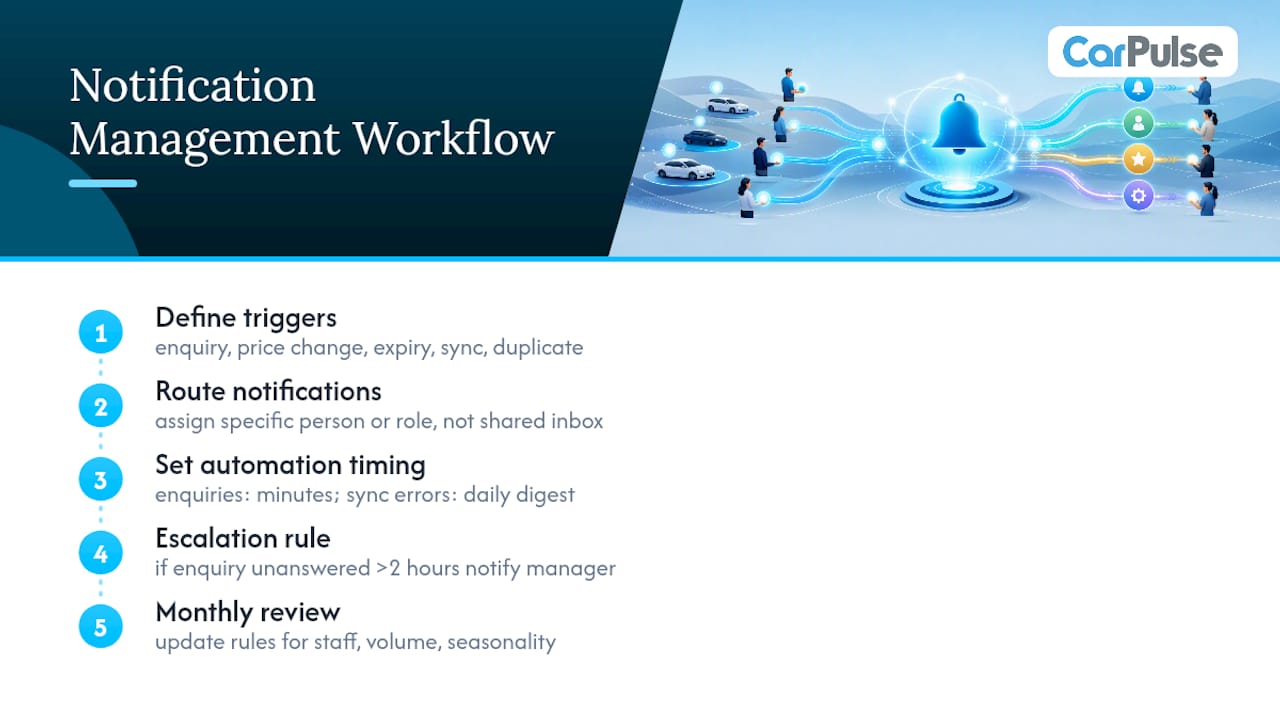
Review your notification rules monthly. Sales staff change, inventory volume shifts seasonally, and a workflow that made sense with three listings a week often breaks down at thirty.
How Should Dealers Handle Recall and Service Alerts?
Recall and service alerts carry a different weight than a routine price-change notification, because they touch safety and legal exposure, not just sales velocity.
Route recall notifications to whoever manages your used inventory directly, not to a general sales alias. That person needs to check the VIN against manufacturer recall databases before the vehicle goes live, and again before it’s handed to a buyer at delivery.
Service alerts tied to a vehicle’s history, an open recall, a pending safety campaign, or a service bulletin, should trigger a hold on the listing until resolved. Publishing a car with an open recall and no disclosure is the kind of gap that turns into a dispute later, and it undermines the trust your verified-dealer status is supposed to signal.
Set a distinct notification tier for anything recall-related so it never gets buried in the same queue as a routine enquiry. A staff member scanning fifteen alerts a day should be able to tell instantly which one is a safety issue and which one is a saved-search match. Color-coding or a separate alert channel both work; what matters is that recall alerts never wait behind lower-priority notifications in the same undifferentiated list.
How Do You Segment Notifications by Dealer Role?
A sales rep and an inventory manager need almost opposite information, and sending both the same alert feed guarantees one of them starts ignoring notifications altogether.
Sales staff should get enquiry alerts, saved-search matches on their assigned inventory, and reminders on listings approaching their refresh window. Inventory managers need sync errors, feed reconciliation flags, duplicate-listing warnings, and pricing anomalies, the operational noise a sales rep doesn’t need cluttering their queue.
Set notification frequency by role too. A sales rep benefits from real-time alerts on enquiries; a manager reviewing sync health across two hundred units is better served by a daily summary than a ping every time one field changes.
- Sales roles: real-time enquiry alerts, saved-search matches, listing-refresh reminders.
- Inventory managers: daily sync digests, duplicate-listing flags, pricing anomaly warnings.
- Owners or general managers: weekly performance summaries covering enquiry volume and stale-listing counts.
Segmenting this way isn’t just cleaner. It’s what keeps notification fatigue from setting in, the point where staff start skimming past alerts because too many of them didn’t apply to their job in the first place.
Connecting Notification Management to CRM and Inventory Systems
A notification system that lives apart from your CRM and DMS creates a second source of truth nobody fully trusts, and that gap is where enquiries slip through.
When a buyer enquiry notification fires, it should log directly into your CRM as a lead, not sit as a standalone alert someone has to manually re-enter later. That single integration point removes the most common failure mode in dealer workflows: a real enquiry that never makes it into the pipeline because the person who saw the notification got pulled onto something else.
Inventory-side integration matters just as much. A sold-unit notification should trigger an automatic status update across your DMS, your website, and your marketplace listings simultaneously, rather than requiring three separate manual edits. That’s the same reconciliation discipline covered earlier in inventory sync, just extended into the notification layer itself.
Test the connection points regularly. A CRM integration that worked fine at launch can quietly break after a software update on either end, and the failure mode is invisible: notifications keep firing, but they stop logging anywhere useful. Schedule a quarterly check where someone manually confirms a test enquiry actually lands in the CRM as a lead, not just as an email in someone’s inbox.
What Security Steps Protect Dealer Notification Data?
Dealer notifications carry buyer contact details, pricing strategy, and sometimes VIN-linked vehicle history. That’s more sensitive data flowing through more channels than most dealerships treat with real caution.
Limit notification access by role. A sales rep doesn’t need visibility into every dealership’s pricing-change alerts across a multi-location group, and a temporary staff member shouldn’t retain notification access after their contract ends. Review access lists quarterly, not just when someone leaves.
Encrypt notification data in transit, particularly for anything routed through email or SMS, since both are common interception points for customer contact information. If your notification system integrates with a CRM, confirm that connection uses a secure API rather than an exported spreadsheet passed between systems by hand.
Buyer contact information collected through enquiry notifications should never be shared outside the dealership’s own team without the buyer’s knowledge. That’s both a trust issue and, depending on how the data gets used, a compliance one. Keep a clear internal policy on how long enquiry data is retained and who can access historical notification logs, especially once a lead goes cold and a staff member moves to a different role.
What the Checklist Misses That Actually Determines Results
Most advice on dealer listing management treats every field as equally important, and that’s the part I’d push back on. A perfectly formatted VIN entry on a listing with four blurry photos still underperforms a rougher description backed by six clear, real photos and a fair price shown up front. The order of operations matters more than the completeness of the checklist.
The bigger blind spot is sync discipline. Dealers obsess over the initial listing quality and then let it go stale for weeks, which is exactly when a buyer hits a dead link and starts doubting every other car on the lot. A daily sync habit does more for enquiry volume than another round of photo retouching ever will.
I’d also push dealers to stop treating notifications as background noise. The dealership that answers an enquiry in ten minutes usually wins the sale over the one with the better price and a six-hour response time. Fast, well-routed notifications are a sales lever, not an administrative chore.
Prioritize VIN accuracy and daily sync first. Everything else on this checklist compounds from there.
— Henri
Get Your Dealership Listings Live on CarPulse
Every checklist item in this guide maps to something CarPulse already builds into the seller flow. Enter a VIN and year, make, model, and trim populate automatically. Bulk upload tools handle inventory in batches instead of one listing at a time, filters and saved searches put your stock in front of buyers already looking for that exact trim, and the mobile app lets you update price or mark a unit sold from the lot itself. Verified dealer profiles give buyers the trust signal your listing needs before they ever call.
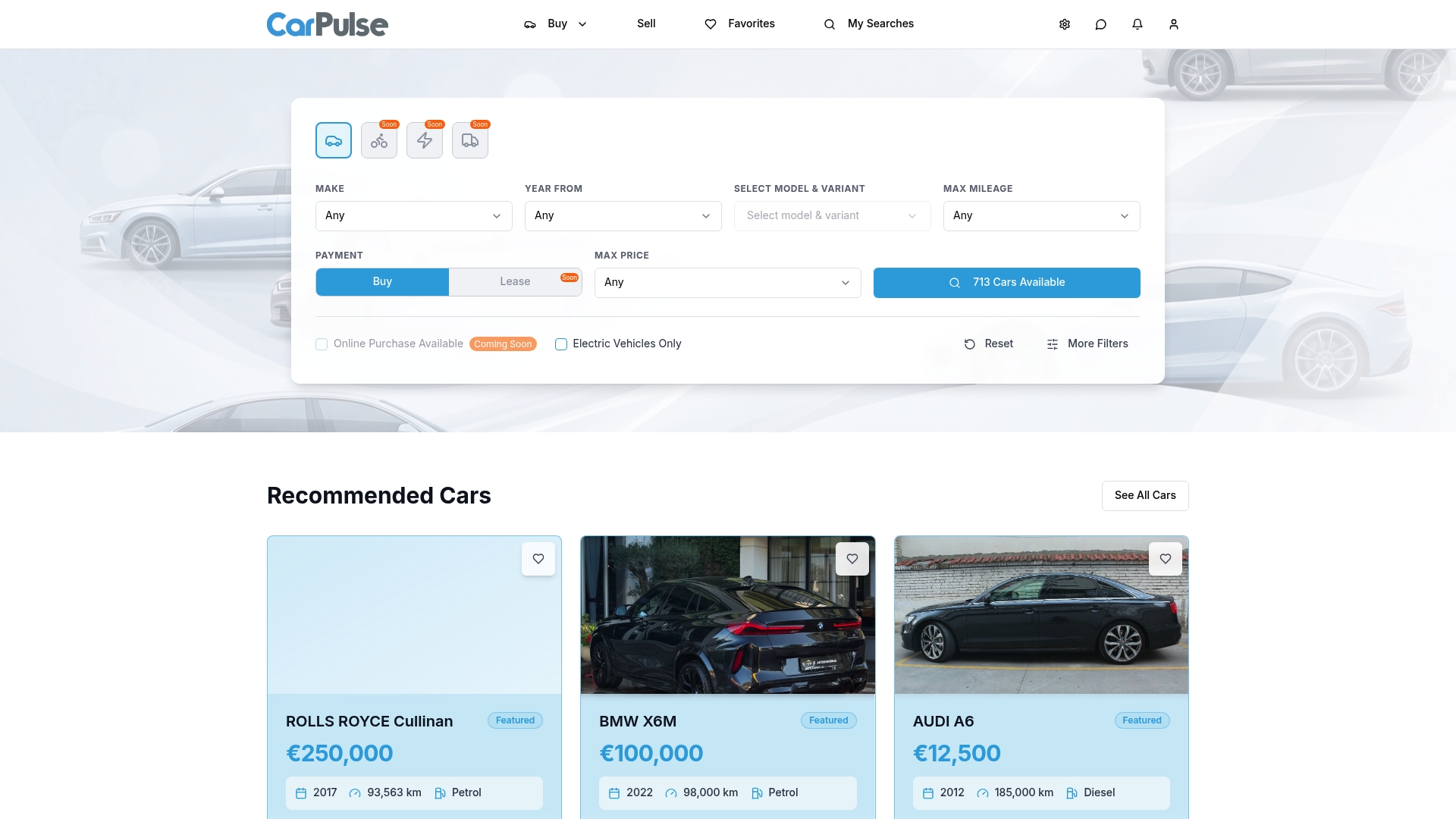
Sign up as a dealer and list your first vehicle through the seller page, where VIN-based creation and bulk upload are ready to use from day one.
Developer Docs and Practical Guides to Consult Next
- Google’s vehicle listing structured data guidance for feed submission, per-page markup, and Rich Results testing.
- High-converting vehicle listing practices for photo, video, and description structure.
- SEO and multi-channel visibility trends relevant to dealer inventory discovery beyond the marketplace itself.
Sources
- Vehicle listing structured data for car dealerships | Google Search Central Blog | Google for Developers
- How to create high-converting vehicle listings
- Optimize Vehicle Listings for Trust & SEO