
Guides
3 Things to Send in Your First In App Message for...
3 Things to Send in Your First In App Message for Albanian Sellers
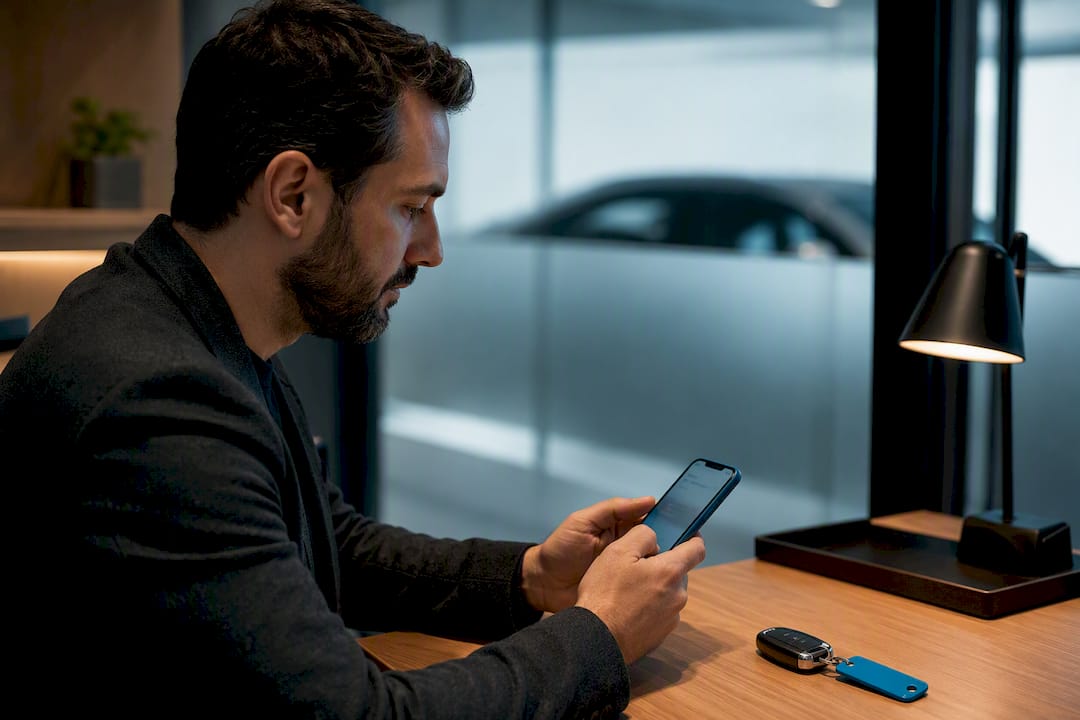
Use the app’s in-app chat, not a phone number or WhatsApp, and send three things in your first reply: a clear photo, the VIN or key spec, and a firm price or availability line. Buyers respond faster when the basics are already answered, and keeping the exchange in-app means every message stays on record if a question or dispute comes up later.
TL;DR:
- Respond quickly within a few hours and use push notifications to keep buyer conversations active, significantly increasing the chances of closing a sale.
- Use in-app chat to record all communications, including price, condition, and promises, creating a reliable audit trail that protects against disputes.
- Share detailed, labeled photos of the vehicle, including the VIN, mileage, and any damage, to answer buyer questions with concrete facts and build trust.
- Keep your templates simple, personalized with specific details, and store them in a note app to reply efficiently without sacrificing accuracy.
- Automate initial responses with saved replies and balance automation with human judgment, ensuring fast, trustworthy exchanges that encourage buyer engagement.
Table of Contents
- How to Start Communication With Buyers in the App
- Message Templates That Actually Convert
- When Should You Respond to Buyer Messages?
- Why Keeping Chat In-App Protects Both Sides
- What to Send: Photos, VIN, and Documents That Build Trust
- How to Handle Offers Without Losing the Sale
- How CarPulse Supports Better Buyer Conversations
- Handling Disputes and Misunderstandings in Chat
- Should You Use a Chatbot for Buyer Messages?
- How to Measure If Your Messaging Is Actually Working
- Author Perspective: Three Quick Priorities for Sellers
- Try CarPulse for Faster, Safer Buyer Conversations
- Useful Resources for Sellers
- Sources
How to Start Communication With Buyers in the App
Every conversation begins the same way: a buyer taps “message seller” on a listing, or you get a notification that someone already asked a question. Either way, the app opens a private thread tied to that specific listing, so both sides can scroll back and see exactly what was said about that car.
Before you type anything, glance back at your own listing. Buyers ask the same handful of questions constantly, and you look far more credible answering them without hesitation.
- Confirm the VIN matches the listing. If you used VIN-based auto-fill when you created the listing, double-check the pulled details (year, trim, engine) are still accurate.
- Check your stated price and mileage. If either changed since you posted, update the listing before replying, not just in the chat.
- Note the vehicle’s current condition. Any new scratch, warning light, or repair since the photos were taken should be mentioned upfront.
- Open the thread within a few hours if possible. Momentum matters. A buyer who messaged five sellers will often go with whoever answers first.
- Reply with a short, factual line. Skip the small talk. State the fact they asked about, then invite the next step.
A few opening lines that work better than “Hi, thanks for your interest”:
- “Yes, still available. 2018 Volkswagen Golf, 94,000 km, one owner, VIN ending 4471. Can send more photos if useful.”
- “Price is firm at the listed amount, but I’m flexible on viewing times this week.”
- “Good question. Timing belt was replaced last year, I have the invoice if you want to see it.”
Notice the pattern: fact first, offer second. That structure alone tends to outperform generic greetings, because it treats the buyer’s time as valuable instead of making them dig for the answer they came for.
Message Templates That Actually Convert
Most sellers write the same reply from scratch a dozen times a week. A handful of saved templates fixes that, as long as you still personalize the specific numbers each time.
Initial inquiry response: “Thanks for asking. [Make/Model, Year], [mileage] km, VIN [last 6 digits]. Price is [amount], negotiable within reason. Let me know if you want more photos or a specific angle.”
Negotiation reply: “I understand the offer, but the price already reflects the recent [service/part] I mentioned. I could do [smaller adjustment] if we can close this week.”
Viewing arrangement: “I’m available [two specific time windows]. Location is [general area, not home address]. Bring your license if you’d like a test drive.”
The reason VIN, exact mileage, and condition notes matter so much is simple: buyers comparing five listings will keep talking to whoever removes the most guesswork fastest. Vague answers push them to the next tab. Structured data does the opposite, and it’s a pattern comparison guides on selling apps consistently flag as a top factor in why some sellers close faster than others.
- Save 3 to 5 core templates, not 20. Fewer templates you actually remember beats a library you never open.
- Swap out the specific number (price, mileage, date) every single time. A copy-pasted mileage figure that doesn’t match the listing kills trust instantly.
- Add one personal detail per reply, like referencing the buyer’s actual question, so it doesn’t read like a bot.
Pro Tip: Keep your templates in a note app, not memorized. Copy, paste, edit the two or three numbers that change, send. That’s the whole workflow, and it takes under thirty seconds per reply.
When Should You Respond to Buyer Messages?
Push notifications and in-app alerts do different jobs, and mixing them up costs you buyers. A push notification fires even when the app is closed, so it’s the one that actually gets a seller’s attention fast. In-app badges and message counters matter once someone has the app open but might miss a thread among several active conversations.
Response speed is the biggest lever you control. A buyer who hears nothing for a day usually assumes the car sold or the seller lost interest, and moves on. Aim to respond within a few hours during the day; if you’re managing several listings at once, batch-check the app two or three times a day rather than leaving it open constantly.
- Turn on push notifications specifically for new messages, not general app updates, so the alerts that matter don’t get buried.
- If you’re handling high message volume, set aside two fixed check-in windows (morning and evening) instead of reacting to every ping.
- Build 3 to 4 saved quick replies for the most repeated questions: availability, price flexibility, viewing times, and payment method.
- Never let a first message sit unanswered past 24 hours if you’re still actively selling the vehicle.
Notification fatigue is real on the buyer side too. Sellers who send unsolicited follow-ups (“still interested?”) every few hours tend to get muted rather than answered, while a single relevant update tied to something the buyer actually asked about keeps the thread alive without annoying anyone.
Why Keeping Chat In-App Protects Both Sides
The single best safety habit in online vehicle sales is refusing to move the conversation off the platform, no matter how convincing the reason sounds. In-app chat creates a message audit trail, timestamped and tied to the specific listing, that becomes the record both sides can point back to if a dispute over price, condition, or a promise made mid-negotiation ever comes up.
- Treat any push to switch to WhatsApp, SMS, or a phone call as a yellow flag. Legitimate buyers rarely insist on it early in a conversation.
- Never send money or accept a deposit before meeting in person. Wire transfer requests from someone who “can’t view the car right now” are a common scam pattern.
- Verify the VIN yourself against the vehicle, not just the listing photo. A mismatch between the VIN on the dashboard and the one in the ad is worth walking away from.
- Prefer platform-supported payment options when available, and if none exist, use a bank transfer confirmed in person rather than cash handed over in an unfamiliar location.
- Meet in a public, well-lit place for the handover, ideally somewhere with other people around, not a buyer’s or seller’s home address on the first meeting.
Encrypted, in-app conversations that stay on the platform give both buyer and seller something valuable: a record an administrator can review if something goes wrong. That’s a meaningfully different position than a deleted WhatsApp thread with no proof either side said what they claim. It’s one reason platforms built around verified accounts encourage sellers to keep every material claim, price, condition, timeline, in writing inside the app rather than in a phone call nobody can produce later.
What to Send: Photos, VIN, and Documents That Build Trust
A buyer deciding whether to drive across town to see your car is really asking one question: “Is this worth my afternoon?” The fastest way to answer that is with specific, well-labeled visual proof, not more adjectives.
- Send a photo of the odometer, the VIN plate, and any damage or wear, not just the flattering exterior angles from your listing.
- Caption each photo with what it shows: “Rear bumper, small scuff, no structural damage” beats a photo with no context.
- Share the VIN’s last several digits directly in chat so the buyer can run their own history check if they want one; you don’t need to hand over the full document upfront.
- Mention service history briefly (last oil change, recent parts replaced) without uploading your entire maintenance file to a stranger.
- Offer a short walkaround video or a live in-app voice call once a buyer seems seriously interested, since it often replaces a wasted trip for buyers coming from out of town.
This kind of structured detail is exactly what how-to guides on in-app messaging point to when explaining why some sellers get faster engagement than others: buyers respond to concrete facts about the item, not promotional language wrapped around a vague description.
How to Handle Offers Without Losing the Sale
Negotiation over chat goes wrong when sellers either cave immediately or go quiet out of frustration. Neither helps you close.
When a lowball offer comes in, acknowledge it before pushing back: “I hear you, but the price already accounts for the new tires and recent service.” That single line does more work than a flat “no,” because it restates the value instead of just rejecting the number.
- Counter narrowly rather than re-negotiating from scratch: offer a small, specific concession tied to a condition, like “I could do a slightly lower price if we close this weekend.”
- When multiple buyers are messaging about the same vehicle, be transparent: “I have another viewing scheduled Thursday, happy to arrange yours before or after.”
- Confirm viewing times in writing inside the chat so there’s no confusion about who gets which slot.
- If you decline an offer, close the loop politely instead of leaving the buyer wondering: “Going with another offer for now, but I’ll reach out if it falls through.”
Pro Tip: Never negotiate two buyers against each other in the same thread by copy-pasting one buyer’s offer into another buyer’s chat. It’s tempting, but it usually backfires and damages trust fast once buyers compare notes.
How CarPulse Supports Better Buyer Conversations
CarPulse builds several of these habits directly into the platform instead of leaving sellers to manage them manually. VIN-based listing auto-fills year, make, model, and trim the moment you enter a VIN, which cuts down on the back-and-forth buyers usually need just to confirm basic specs. Saved searches and bookmarking mean serious buyers find your listing again without re-messaging you from scratch, and dedicated buyer and seller accounts keep the identity behind each message consistent across the whole conversation.
In-app messaging on CarPulse keeps every exchange, price discussion, condition disclosure, viewing arrangement, tied to a specific listing and timestamped, which gives both sides a reference point if a disagreement surfaces later. Combined with a verified-dealer network for professional sellers, that conversation history does real work in reducing disputes: buyers can see who they’re actually talking to, and sellers have a record of exactly what was promised.
The mobile apps for iOS and Android extend all of this beyond the desktop, so a seller can confirm a VIN detail or reply to a viewing request from wherever they happen to be standing.
Handling Disputes and Misunderstandings in Chat
Most buyer-seller disputes trace back to one thing: something said (or assumed) that never got written down. A price quoted verbally, a condition detail mentioned once and forgotten, a viewing time that got miscommunicated. In-app chat fixes most of this by default, because the conversation itself becomes the record.
When a disagreement comes up, the first move is to scroll back through the actual thread rather than relying on memory. If a buyer claims you promised something you didn’t, the message history usually settles it in seconds. If you genuinely did make an error, correcting it clearly and quickly in the same thread protects your reputation far more than going quiet.
A few habits keep small misunderstandings from turning into disputes:
- Restate agreements in writing, even after a phone call or in-person conversation: “Just to confirm what we discussed, price is X, meeting Saturday at 2pm.”
- If a buyer misread a listing detail, correct it politely without assuming bad faith. Most mix-ups are genuine, not manipulation.
- Keep tone neutral even when frustrated. A defensive message tends to escalate, while a factual one usually de-escalates.
- If a dispute can’t resolve between the two of you, the platform’s message history gives an administrator something concrete to review.
Treat every thread as a small trust ledger. It’s not just about closing the sale, it’s proof that protects you if anything about the transaction gets questioned afterward.
Should You Use a Chatbot for Buyer Messages?
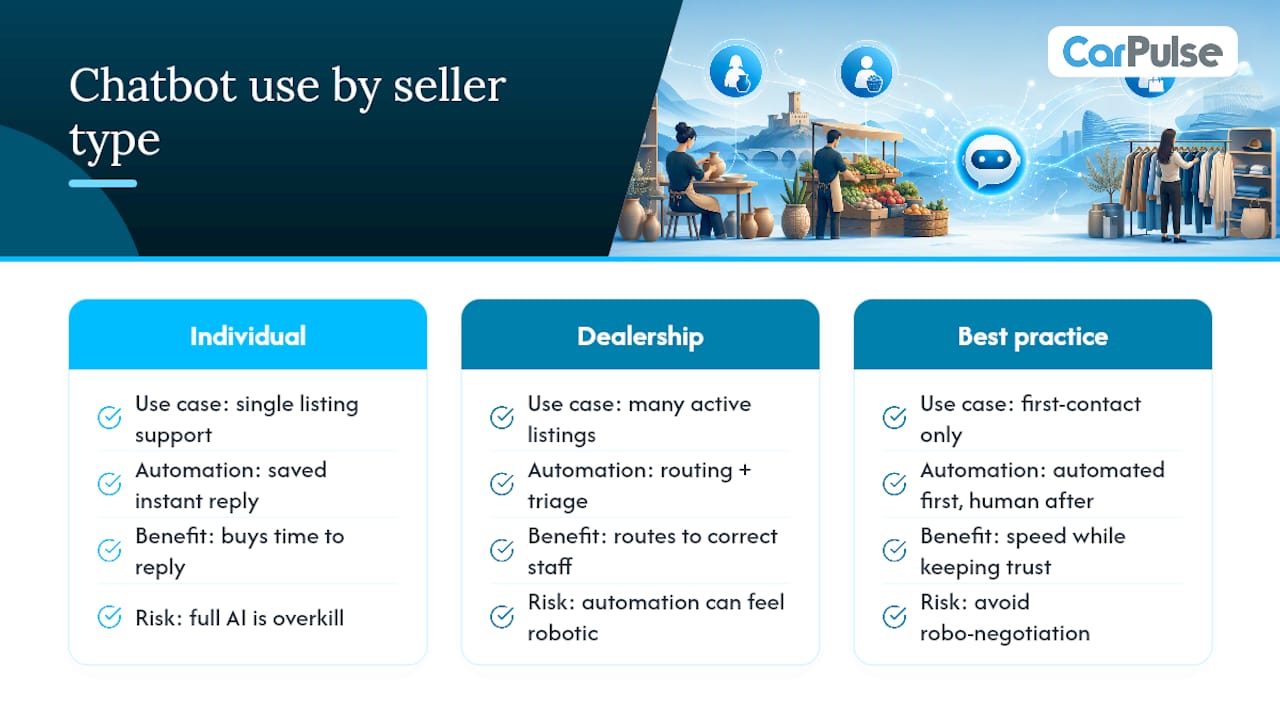
Automated replies and AI assistants have moved from novelty to standard practice in customer messaging, and vehicle marketplaces are catching up. Platforms like Intercom show how AI agents can centralize conversation context and route repetitive questions automatically, while tools like Trengo unify multiple channels into a single inbox with automated first responses.
For an individual seller, a full AI assistant is usually overkill. What actually helps is a lighter version of the same idea: a saved instant reply that fires the moment someone messages, confirming the listing is still active and pointing to your saved template for specs. That single automated line buys you time to reply properly without leaving a buyer wondering if anyone’s home.
Dealerships managing dozens of active listings benefit more from genuine automation, routing incoming questions to whichever staff member handles that vehicle, flagging urgent messages, and logging response times. The tradeoff to watch for is the same one that trips up bigger platforms: automation that feels robotic loses the personal trust that makes a buyer comfortable enough to actually show up for a viewing. A bot that says “Thanks, checking and will reply shortly” works. A bot that tries to negotiate price on your behalf usually doesn’t.
The right balance is automation for the first response, human judgment for everything after.
How to Measure If Your Messaging Is Actually Working
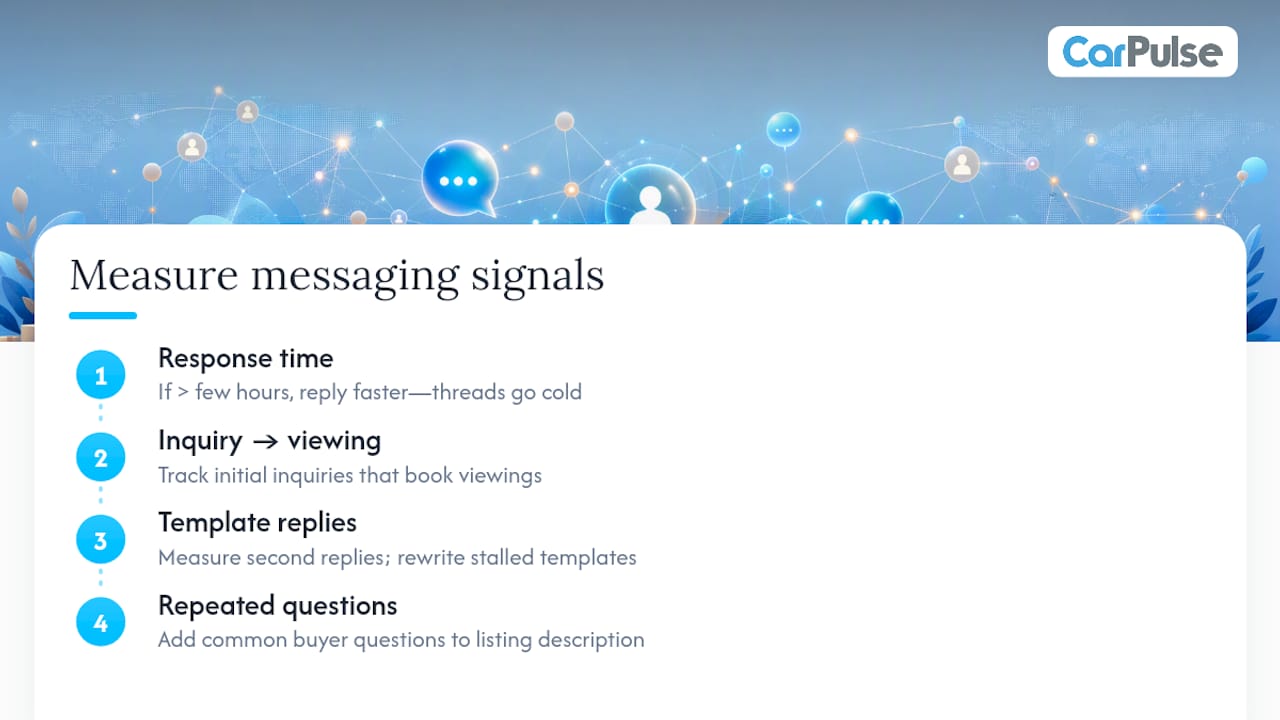
You can’t improve what you don’t track, and most sellers never look past “did it sell.” A few simple signals tell you whether your messaging approach is helping or quietly costing you buyers.
Response time is the easiest one to watch. If you notice threads going cold after you take more than a few hours to reply, that’s your answer, not a coincidence. Compare how many initial inquiries turn into a scheduled viewing if you track your messages carefully. If buyers ask a question and then vanish, the problem is usually in how the first reply was written, too vague, too slow, or missing a fact they needed.
Track which templates actually get a second reply versus which ones get silence. A template that consistently stalls conversations needs rewriting, not repeating. Pay attention to the specific questions buyers keep asking that your listing doesn’t already answer. If three different buyers ask about the same thing, that detail belongs in your listing description, not just your chat replies.
None of this requires a dashboard. A simple note of “asked, replied same day, viewing booked” across your last ten conversations will show you a pattern within a week. Sellers who adjust based on that pattern close faster than sellers who repeat the same generic reply regardless of what’s actually working.
Author Perspective: Three Quick Priorities for Sellers
If you take one thing from this guide, make it speed. Buyers rarely wait around for the perfect answer. They message five sellers and go with whoever responds first with something concrete. Clarity is the second priority, and it’s the one most sellers skip because it feels slower in the moment. A VIN, a firm price, and an honest note about a scratch save you three follow-up messages and one wasted viewing.
The third priority is the one I’d argue matters most long-term: keeping every exchange in-app. It feels like a small habit until the day a buyer disputes what was said, and suddenly the thread is the only proof either side has. Pick one template from this guide, use it for your next five buyer messages, and just watch how much faster people reply when the guesswork is gone.
— Henri
Try CarPulse for Faster, Safer Buyer Conversations
If you’re selling a vehicle and want buyers to actually reach you quickly, CarPulse gives you the in-app messaging, VIN-based listing, and mobile access this guide has been describing, without needing a third-party inbox tool to piece it together. Create a seller account, list your vehicle using VIN auto-fill so the specs buyers care about are accurate from the first message, and build a small set of saved replies for the questions you already know are coming.
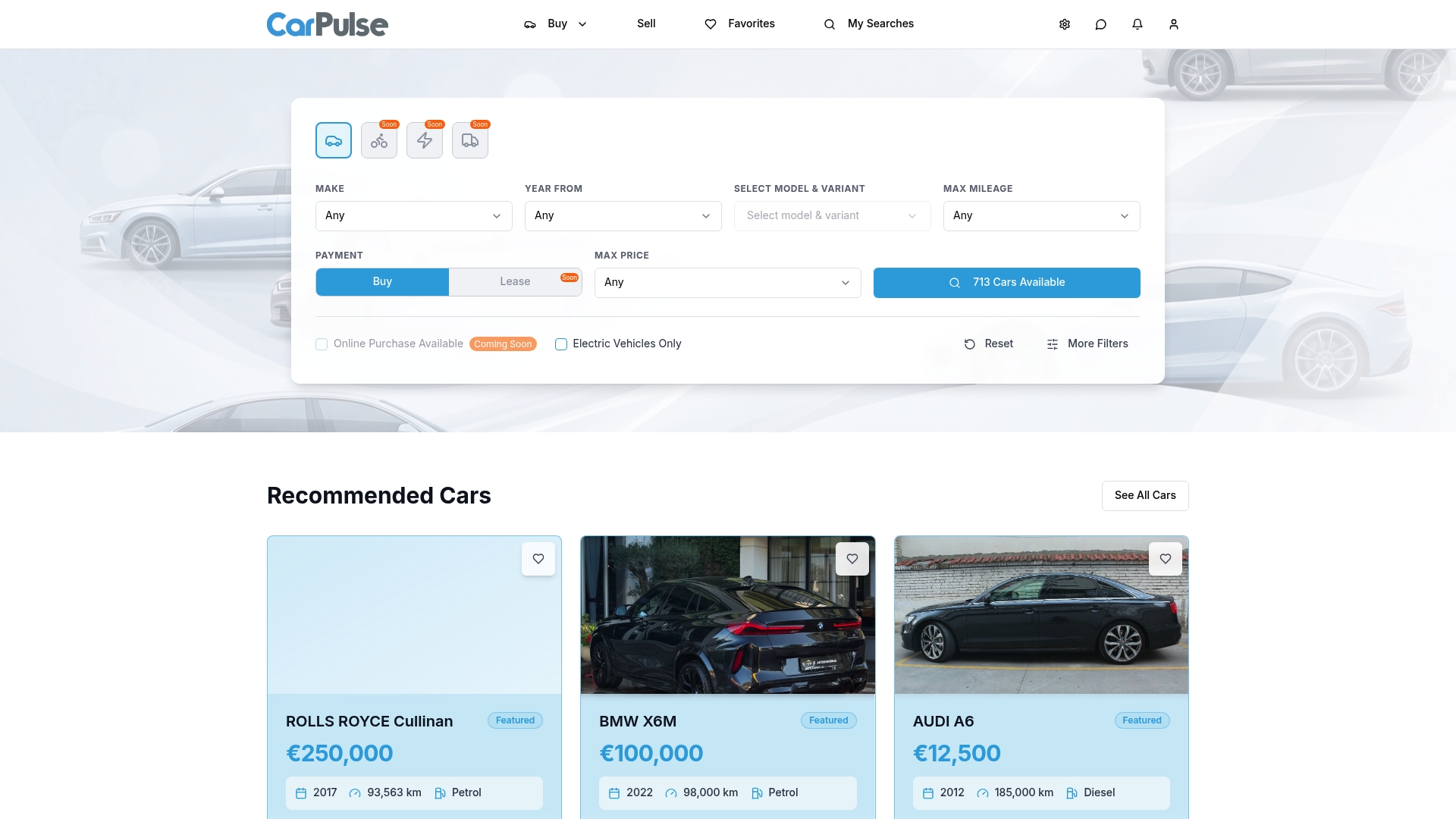
Every conversation stays inside the platform, tied to your listing, so you’re not relying on memory or a deleted text thread if a question comes up later. Whether you’re an individual seller listing one car or a dealership managing dozens, the same in-app structure applies: faster replies, clearer listings, and a conversation history you can actually point back to. Head to CarPulse’s marketplace to create your listing and start applying these templates on your very next buyer message.
Useful Resources for Sellers
- CarPulse blog: listing cars online in Albania, for photo and VIN listing tips.
- Guide to buying a used car safely, for handover and payment safety steps.
- Trengo, an example of unified inbox and automated-reply tools.