Guides
Over-the-Air Updates Explained: How OTA Works
Over-the-Air Updates Explained: How OTA Works
An over-the-air (OTA) update is the wireless delivery of new software, firmware, or configuration data to a device via Wi-Fi or cellular networks, with no cable or technician required. Your phone patches a security hole at 2 AM while you sleep. Your car’s navigation maps refresh in the driveway. A temperature sensor in a warehouse gets a bug fix without anyone touching it. That is OTA in practice, and it applies to smartphones, vehicles, routers, and virtually any connected device.
Key Takeaways
OTA updates deliver software, firmware, or configuration data wirelessly to devices, keeping them secure and capable without physical service visits.
| Point | Details |
|---|---|
| Core definition | OTA updates push software or firmware to devices wirelessly, covering phones, vehicles, routers, and IoT sensors. |
| Typical lifecycle | Every update follows: check, download, verify, install, post-install verification, and reboot or rollback. |
| Delta updates save data | Delta (diff) updates send only changed bytes, reducing bandwidth and battery use compared to full-image downloads. |
| Main risks | Failed installs, bricking on constrained hardware, and unauthorized firmware are the realistic risks; code signing and rollback mitigate them. |
| Security action to take now | Enable automatic updates, use strong account credentials, and apply large updates on Wi-Fi with the device on a charger. |
Table of Contents
- What are over-the-air updates, and what do the terms mean?
- How do over-the-air updates work, step by step?
- What types of OTA updates exist, and how do delivery strategies differ?
- Where are OTA updates used in the real world?
- What are the benefits of OTA updates, and what risks should you watch for?
- What technical standards and protocols power OTA systems?
- What should you expect when your device receives an OTA update?
- A security checklist every OTA user should follow
- Why OTA matters more now than it ever has
- Sources
What are over-the-air updates, and what do the terms mean?
The vocabulary around OTA can feel scattered, so here is a quick map. According to Wikipedia’s overview of OTA, the term “over-the-air programming” covers the same concept and has been applied to embedded systems, phones, set-top boxes, and cars for decades. Before OTA existed, updating a device meant physically connecting it via JTAG or USB, which made large-scale distribution nearly impossible.
Three terms show up most often:
- OTA (over-the-air update): The umbrella term for any wireless update delivery, whether it touches firmware, software, or configuration files.
- FOTA (firmware OTA): Targets the low-level firmware that controls hardware behavior. A car’s engine control unit (ECU) receiving a calibration fix is a FOTA update.
- SOTA (software OTA): Targets the application layer. Your phone’s operating system patch or an infotainment app refresh falls here.
A fourth type worth knowing: configuration OTA, which pushes settings or cryptographic keys without touching the core code. Think of a router receiving updated DNS settings or a device getting a new security certificate.
Quick examples to anchor the terms: an Android security patch is SOTA; a car’s adaptive cruise control recalibration is FOTA; a smart thermostat receiving new scheduling logic is a configuration OTA.
How do over-the-air updates work, step by step?
The consumer-facing OTA lifecycle follows a consistent pattern across device types, even though the details differ between a phone and a car.
- Check: The device contacts the update server, either on a schedule or when you tap “check for updates.” The server compares the device’s current version against available packages.
- Download: The update package transfers over Wi-Fi or cellular. On phones, this often happens in the background. On vehicles, the infotainment screen typically shows a progress bar.
- Verify: Before anything installs, the device checks the package’s cryptographic signature to confirm it came from a legitimate source and was not tampered with in transit.
- Install: The new code writes to storage. On phones with A/B partitions, this happens on the inactive partition so the device stays usable. On vehicles, some installs require the car to be parked and the engine off.
- Post-install verification and reboot: The device confirms the install succeeded, then reboots into the new version. If verification fails, a rollback kicks in automatically, restoring the previous working state.
For vehicles specifically, Consumer Reports notes that users are notified via the infotainment screen and should have the vehicle parked before installation begins. Some critical safety-related updates can resolve issues that would otherwise require a dealership visit.
Phones handle this more quietly. Android and iOS both support background downloads, so the only moment you notice is the reboot prompt. Automatic updates are common for security patches; larger OS upgrades usually ask for your approval first.
Pro Tip: Apply large updates on Wi-Fi and with your device plugged in or your car connected to a charger. A failed install caused by a dead battery mid-write is one of the few ways an OTA update can go wrong.
What types of OTA updates exist, and how do delivery strategies differ?
Not every update is the same size or delivered the same way. Manufacturers choose strategies based on bandwidth cost, device risk, and how many users are in the rollout.
Full vs. delta updates
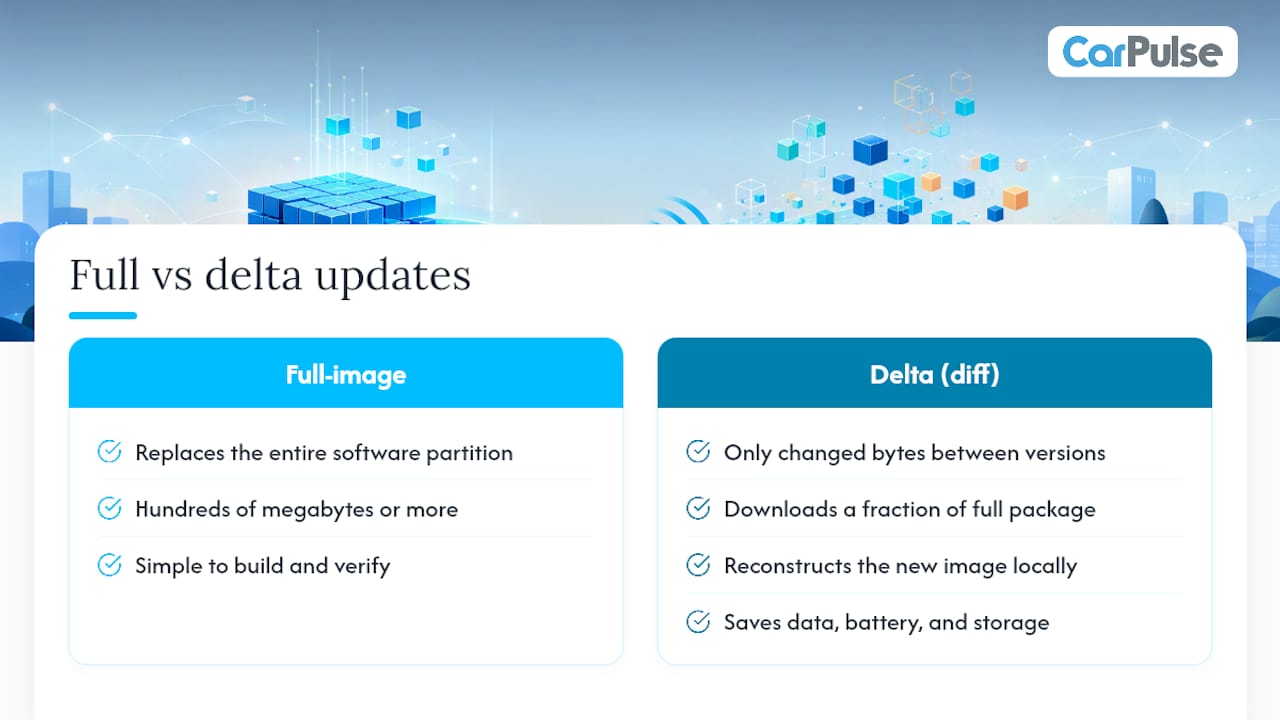
A full-image update replaces the entire software partition. It is simple to build and verify, but it can be hundreds of megabytes or more. A delta (diff) update contains only the changed bytes between the old and new version. Android’s OTA documentation describes how delta techniques let devices download a fraction of the full package and reconstruct the new image locally, saving data, battery, and storage. For IoT sensors on cellular connections, that difference is significant.
Push vs. pull delivery
With push delivery, the server initiates the update and sends it to the device. Manufacturers use this for critical security patches where waiting for users to act is too risky. Pull delivery means the device checks in on its own schedule or when the user requests it. Most phone OS upgrades use pull; emergency firmware fixes often use push.
A/B partitions and staged rollouts
Android’s Virtual A/B design keeps two partitions: one running, one idle. The update installs to the idle partition in the background, and the device swaps at reboot. If the new partition fails verification, the system falls back to the previous one automatically. This eliminates the window where a device is unusable mid-install.
Staged rollouts add another layer of safety.
Where are OTA updates used in the real world?
Smartphones
This is the most familiar context. Both Android and iOS deliver monthly security patches, annual OS upgrades, and app updates entirely over the air. The process is largely invisible: the package downloads overnight, and you see a “Restart to update” prompt in the morning. Google’s Pixel devices and Samsung Galaxy phones also use OTA to push camera algorithm improvements and AI feature additions between major OS releases.
Vehicles
Modern vehicles can carry dozens of electronic control units, and OTA has become central to how automakers maintain them post-sale. Infotainment systems, telematics units, and increasingly the ECUs governing powertrain and safety systems all receive wireless updates. The safety constraints are stricter than on phones: most installs require the vehicle to be parked, and some require the engine off or a specific battery charge level. OTA has also allowed manufacturers to resolve safety-related issues remotely that would previously have required a recall and a dealer visit.
If you are evaluating a vehicle’s software capabilities, Carpulse’s 2026 vehicle features guide covers which modern models ship with robust OTA infrastructure.
IoT devices and remote sensors
OTA is essential at IoT scale. A company managing thousands of field sensors cannot send a technician to each one for a firmware patch. Remote OTA delivery, combined with staged rollouts and telemetry monitoring, lets engineers deploy fixes and pause a rollout if error rates climb unexpectedly. Without this, fielded devices would stay unpatched and vulnerable indefinitely.

Home routers and set-top boxes
These devices often update automatically at night, rebooting without user interaction. The update might add a security patch, fix a Wi-Fi performance bug, or enable a new parental control feature. Most users never notice, which is the point.
What are the benefits of OTA updates, and what risks should you watch for?
Key benefits
- Security patching at scale: Manufacturers can push fixes to millions of devices within hours of discovering a vulnerability, rather than waiting for users to visit a service center.
- New features post-sale: A car or phone you bought two years ago can gain capabilities it did not ship with. Voice control improvements, new infotainment apps, and performance tuning all arrive this way.
- Fewer dealer visits and reduced recall costs: OTA updates let manufacturers resolve issues remotely that would otherwise require physical service, cutting both consumer inconvenience and manufacturer logistics costs.
- Extended device lifespan: Devices stay relevant longer when software improvements keep arriving. This matters for both consumers and manufacturers trying to reduce hardware waste.
Risks to know
- Failed installs: A power loss or network interruption mid-install can leave a device in an inconsistent state. Rollback mechanisms exist for this, but they are not universal.
- Bricking: In rare cases, a corrupted or incompatible update can render a device unresponsive. This is more common on constrained IoT hardware without rollback support.
- Unauthorized firmware: A device that accepts updates without proper signature verification is vulnerable to malicious firmware injection.
- Privacy considerations: OTA systems often collect telemetry to monitor update success. Understanding what data your device sends back is worth checking in the manufacturer’s privacy policy.
Pro Tip: Only accept OTA updates from official manufacturer channels. If a prompt appears on an unfamiliar network or from an unexpected source, decline and connect to a trusted network before updating.
Security mitigations that responsible manufacturers implement include code signing (every package is cryptographically signed by the manufacturer’s private key), secure boot (the device only runs code that passes signature checks at startup), integrity verification (hash checks before and after install), and staged rollouts to catch problems before they reach the full user base.
What technical standards and protocols power OTA systems?
OTA is not a single protocol. It is a stack of choices, and the right combination depends on the device type and deployment context.
Transport protocols: HTTPS is the baseline for most consumer devices, providing encryption in transit. MQTT is common in IoT deployments where devices maintain persistent, low-overhead connections to a broker. Both carry the update package; the difference is in connection model and overhead.
Management protocols: OMA-DM (Open Mobile Alliance Device Management) has been the standard for mobile device management for years, handling update scheduling and status reporting. LwM2M (Lightweight M2M) is its successor for constrained IoT devices, designed for low-power hardware with limited memory.
Signing and verification: Every production OTA system signs packages with a private key held by the manufacturer. The device holds the corresponding public key and refuses any package that fails verification. FreeRTOS’s OTA documentation describes how embedded platforms handle this in constrained environments, including staging, rollout control, and verification steps suited to devices with limited compute.
Delta and diffing: The device receives a diff file, applies it to the current image in memory or storage, and produces the new image locally. This is standard practice for bandwidth-constrained deployments.
Virtual A/B partitions: As described in Android’s architecture documentation, the idle partition receives the new image while the device runs normally. At reboot, the bootloader switches partitions. If the new partition fails its boot verification, the bootloader reverts to the previous one without user intervention.
In automotive contexts, telematics control units (TCUs) act as the gateway between the cellular network and the vehicle’s internal CAN bus, routing updates to individual ECUs. Edge-to-cloud and gateway-to-cloud architectures serve similar roles in industrial IoT.
What should you expect when your device receives an OTA update?
What to expect
- A notification: Phones show a system alert; vehicles display a prompt on the infotainment screen. Some IoT devices update silently with no user-facing signal.
- A recommended power and network state: Large updates should run on Wi-Fi and with the device plugged in or a vehicle connected to a charger. Cellular updates are possible but consume data and are slower.
- Install time: A phone security patch takes a few minutes. A major OS update or a vehicle firmware update can take 20–45 minutes, depending on package size and hardware speed.
- A reboot: Nearly every OTA update ends with a restart. Plan for it.
Troubleshooting common problems
- Update stuck or failed: Restart the device and try again. Check that storage is not full, since some updates need temporary space to unpack.
- Repeated failure: Try switching from cellular to Wi-Fi, or vice versa. If the problem persists, contact the manufacturer’s support line.
- Vehicle update issues: If a vehicle update fails, do not attempt to drive until you confirm the system is stable. Contact the dealer or manufacturer’s support. Some vehicles have a recovery mode accessible through the infotainment menu.
- Forced updates: Some critical security or safety updates cannot be deferred indefinitely. Manufacturers may push these automatically, particularly for recall-equivalent issues. Accepting them promptly is the right call.
Data and cost considerations
Delta updates significantly reduce cellular data consumption compared to full-image downloads. Still, a major OS update over cellular can use several gigabytes. If you are on a limited data plan, waiting for Wi-Fi is worth the delay.
A security checklist every OTA user should follow
The shift toward software-defined vehicles (SDVs) means your car’s account credentials are now as sensitive as your banking login. The same security habits that protect your phone apply directly to your vehicle.
- Enable automatic updates where available, particularly for security patches. Devices that fall behind on updates are the most exposed.
- Use strong, unique passwords for any account tied to device management, including vehicle manufacturer apps and smart home platforms.
- Install updates on trusted networks. A public Wi-Fi hotspot is not the right place to apply a firmware update, especially for a vehicle or IoT hub.
- Prefer Wi-Fi and a charger for large updates. This is not just about speed; it reduces the chance of a failed install from a dropped connection or dead battery.
- Never share vehicle account credentials. Treat them the way you would treat your phone’s Apple ID or Google account.
- Verify the source. Updates should come from the manufacturer’s official app or the device’s built-in update mechanism. A text message or email with a link to “update your firmware” is a red flag.
Pro Tip: For vehicles, schedule OTA installs for when the car is parked at home on a secure Wi-Fi network with sufficient battery or charge. Avoid starting an install right before a planned trip.
Code signing and authenticity checks are the technical backstop for all of this. When a manufacturer signs an update package, any tampering in transit changes the hash and the device rejects the package outright. That verification step is what separates a secure OTA system from a vulnerability.
Why OTA matters more now than it ever has
The software-defined vehicle is not a future concept. It is the present reality for a growing share of new cars on the road, and OTA is what makes it viable. A vehicle that cannot receive wireless updates is effectively frozen at its factory software state, which means security vulnerabilities accumulate and features never improve. OTA flips that: the car you buy today can be meaningfully better in two years without a single dealer visit.
What I find underappreciated is how much OTA changes the calculus for used car buyers. A vehicle with a strong OTA track record from its manufacturer is a different proposition than one that has been static since it left the factory. When you are evaluating a used car, checking whether the manufacturer actively pushes updates is now a legitimate part of the decision, right alongside mileage and service history. Carpulse’s vehicle comparison tools can help you weigh software-defined features alongside the traditional specs when comparing models.
OTA is not a risk-free convenience. It is a maintenance system, and like any maintenance system, it requires some attention. Treat it that way and it works well. Ignore it entirely and you are running outdated software on hardware that was designed to stay current.
Sources
- What is OTA? A Comprehensive Guide to Vehicle Over-the-Air …
- OTA IoT Breakdown: What OTA Is and How It Works in IoT
- Android documentation: Over-the-air (OTA) updates and Virtual A/B